At Success.co, we’re passionate about helping teams thrive. Recently, in a great conversation with Sid Jashnani, we discussed a common challenge: keeping teams aligned with the recommended EOS meeting agenda. (If you're new to it, here's how to run a Level 10 Meeting.)
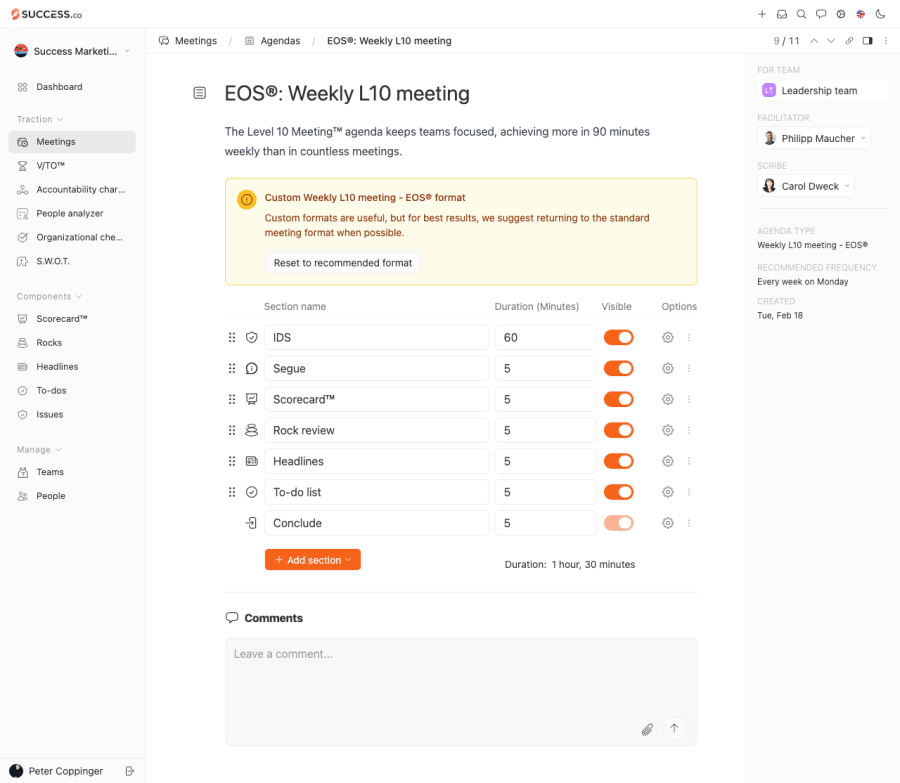
We noticed it was a bit too easy for users to accidentally change the L10 agenda — and too hard to restore it back to the standard format. So, we made two improvements to make life easier and help you stay on track.
1. Protecting the L10 Agenda
Now, agendas can’t be edited unless the user explicitly chooses to unlock them. This prevents accidental changes and keeps your meetings consistent with the EOS method. Running your L10 outside Success.co? The free Level 10 Meeting template follows the same agenda.

2. One-Click Reset to Default
If your team ever customizes the agenda and wants to revert, resetting to the default EOS format is now effortless — just two clicks away.
It’s the small improvements like these that help teams focus on what really matters — running great meetings and building thriving companies. See how they fit into our L10 meeting software.
We love hearing your feedback and ideas. Keep them coming — we’re always working to make it easier for the world to thrive on EOS.